Ensuring HIPAA IT compliance is a legal necessity for modern US healthcare practices, business associates, and healthtech organizations. Under the Health Insurance Portability and Accountability Act (HIPAA), covered entities must implement strict technical safeguards to protect electronic Protected Health Information (ePHI).
As US healthcare providers migrate infrastructure to cloud environments and deploy telemedicine platforms, regulatory scrutiny from the Department of Health and Human Services (HHS) Office for Civil Rights (OCR) has intensified. Failing an audit or suffering a data breach can result in tier-4 civil monetary penalties exceeding $1.9 million per year.
This step-by-step checklist outlines the essential technical controls, infrastructure standards, and administrative safeguards required to maintain full compliance in 2026.
1. Technical Safeguards: Securing ePHI Infrastructure
The HIPAA Security Rule (45 CFR § 164.312) outlines specific technical controls required to protect access to health data across databases, servers, and endpoints.
Mandatory Access Control & Authentication
- Unique User Identification: Every staff member, doctor, and vendor must have a distinct login ID. Shared administrator accounts are strictly prohibited.
- Multi-Factor Authentication (MFA): Mandatory MFA across all email clients, EHR/EMR portals, cloud storage environments, and Remote Desktop Protocol (RDP) connections.
- Automatic Logoff: Systems storing or processing ePHI must automatically terminate sessions after a maximum of 15 minutes of inactivity.
Encryption Standards
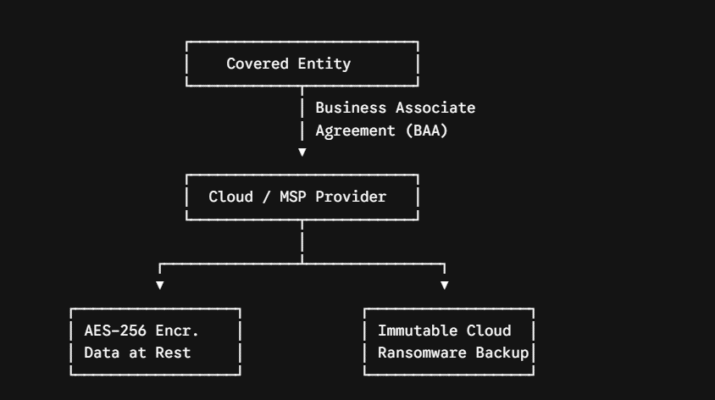
- Data at Rest: All databases, hard drives, USB backups, and server volumes containing ePHI must be encrypted using AES-256 encryption.
- Data in Transit: All network communications transferring ePHI must enforce TLS 1.3 (or TLS 1.2 minimum) with strict HTTPS protocol enforcement. Email systems sending ePHI externally must use encrypted email gateways (S/MIME or TLS).
2. Physical & Cloud Storage Security
Securing hardware components and vendor access is as vital as digital access controls.
Business Associate Agreements (BAAs)
Before uploading any patient data or hosting infrastructure on a third-party platform (such as AWS, Google Cloud, Microsoft Azure, or an MSP), you must execute a signed Business Associate Agreement (BAA). A standard enterprise contract without an explicit BAA is an automatic HIPAA violation.
Data Backup & Disaster Recovery
- Immutable Offsite Backups: Maintain automated, immutable cloud backups to protect patient records against ransomware encryption attacks.
- Disaster Recovery Testing: Conduct and document data restoration testing at least twice per year to ensure a Recovery Time Objective (RTO) under 4 hours.
3. Administrative Safeguards & Audit Logs
Comprehensive Audit Controls
- Log Retention: Infrastructure audit logs (firewall logs, database queries, authentication logs) must record every access request touching ePHI.
- Log Review & Storage: Logs must be stored securely for a minimum of 6 years in an unalterable format (SIEM integration recommended).
Risk Assessment & Penetration Testing
- Annual Risk Analysis: Conduct a formal risk assessment documenting potential vulnerabilities across all network endpoints, mobile devices, and cloud apps.
- Vulnerability Scanning: Execute quarterly vulnerability scans and annual third-party penetration tests.
Read More: Administrative Safeguards – Risk Assessment
4. Summary Compliance Checklist Table
| Requirement Area | Technical Standard | Priority |
| Data Encryption | AES-256 (At Rest) / TLS 1.3 (In Transit) | Mandatory |
| Access Control | MFA on all systems + Role-Based Access (RBAC) | Mandatory |
| Vendor Contracts | Signed Business Associate Agreement (BAA) | Mandatory |
| Audit Logging | Centralized SIEM logging retained for 6 Years | Mandatory |
| Data Resilience | Immutable cloud backups with 4-hr RTO | High Priority |